Why Your Port Forwarding Fails: The Hidden Logic of Destination NAT
This post is part of the Container Networking From Scratch series — follow a packet’s path through the Linux kernel, from namespaces to NAT.
Most DevOps engineers think typing -p 8080:80 is a simple port map, but they have no idea that the Linux kernel is actually performing a high-speed surgical strike on every incoming packet header. If you don’t understand the PREROUTING hooks and DNAT transformations, you’re just one iptables conflict away from losing all external traffic to your containers.
The Entry Point to the Private Network
When you run a container on a private subnet, it is effectively invisible to the outside world. This is by design. However, at some point, that service needs to be useful, which means it needs to accept traffic from the internet or other parts of your infrastructure. This creates a fundamental networking problem: an external client knows your host’s public IP, but it has no idea that Nginx is running inside a namespace at 172.17.0.2.
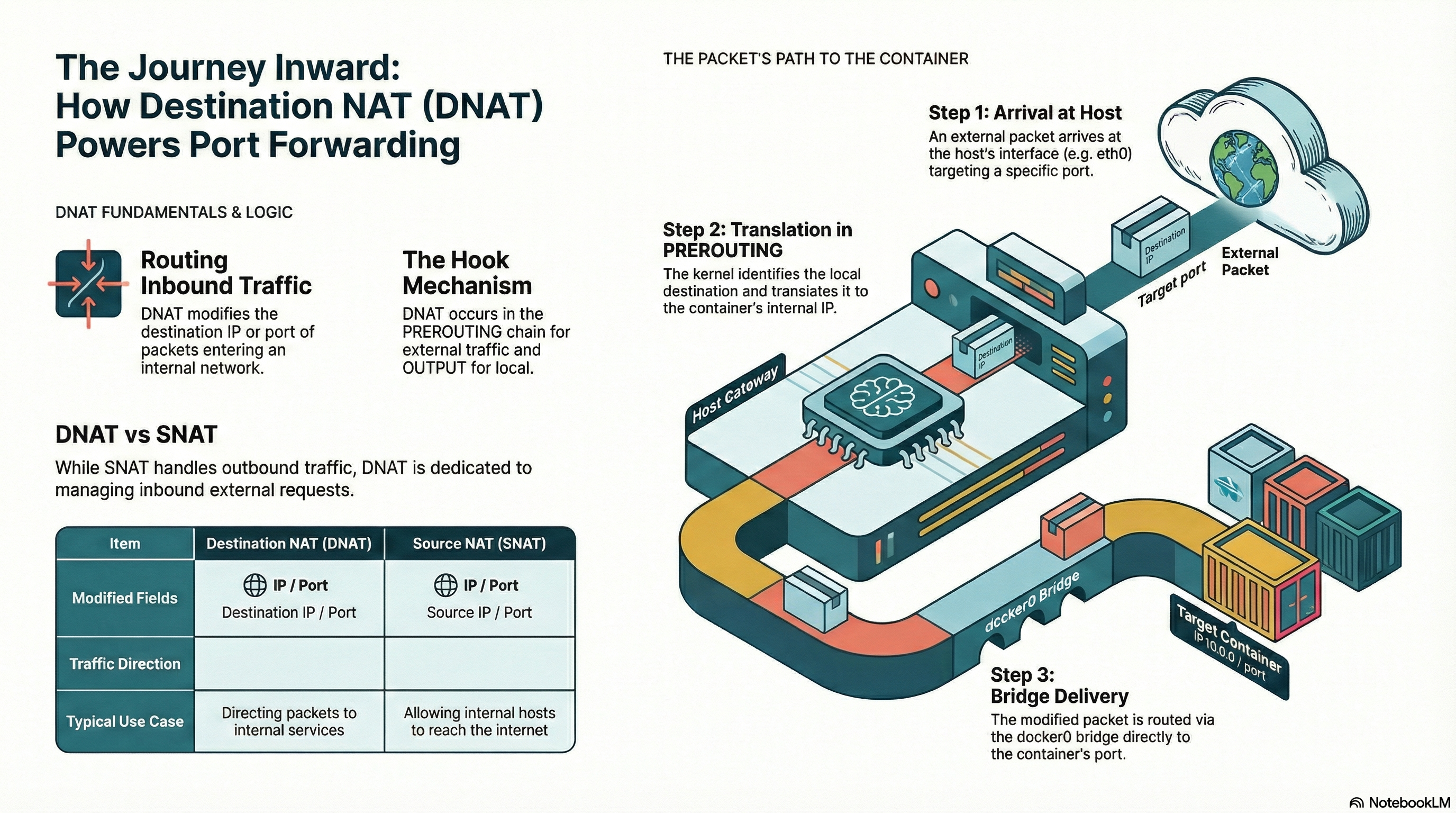
Destination NAT, or DNAT, is the technology that bridges this gap. It lives in the Netfilter framework and acts as the “Receptionist” for your host. Its job is to watch for packets hitting specific ports on the host’s physical interface and, before the kernel even makes a routing decision, rewrite the destination field to point to the internal container. This is the foundation of port forwarding, reverse proxies, and Kubernetes LoadBalancers. Without DNAT, your internal services remain trapped behind the host’s network boundary.
Setting Up the DNAT Laboratory
We are going to strip away the Docker CLI and build this entry path manually to see exactly where packets live and die in the kernel. I’m using a clean Ubuntu 24.04 server on iximiuz Labs.
Our lab setup consists of:
- One Nginx Container: Running in a network namespace with IP
172.17.0.2. - A Host Interface (
eth0): Representing the public gateway. - TCP port 12345: This will be our “public” entry point on the host.
- iptables: We’ll be manipulating the
nattable directly.
The goal is to send a request from an external machine to the host’s IP on port 12345 and see it successfully land on the container’s port 80. If we see the Nginx welcome page, our DNAT logic is solid.
Step-by-Step Breakdown: Forcing the Entry
First, we need to understand that DNAT happens very early in the packet’s life. We use the PREROUTING chain because the destination IP must be changed before the kernel looks at its routing table. If we wait until after routing, the kernel will think the packet is for a local process on the host and might drop it if no process is listening on that port.
sudo iptables -t nat -A PREROUTING -p tcp --dport 12345 -j DNAT --to-destination 172.17.0.2:80
When a packet hits eth0 with a destination of HostIP:12345, this rule triggers. The kernel physically overwrites the destination IP in the IP header with 172.17.0.2 and the port in the TCP header with 80.
Next, the kernel performs a “Routing Decision.” It sees the new destination is 172.17.0.2, which it knows is reachable via the docker0 bridge. It then hands the packet to the FORWARD chain in the filter table.
sudo iptables -t filter -A FORWARD -d 172.17.0.2 -p tcp --dport 80 -j ACCEPT
Without this second rule, the packet would be rewritten but then immediately blocked by the firewall. This is why many “manual” port forwarding attempts fail; people forget that NAT only changes the address—it doesn’t grant permission to pass.
The “Local Loopback” Production Mistake
A classic production mistake occurs when an engineer tests a port-forwarded service from inside the host itself. They run curl localhost:12345 and it fails, even though it works perfectly for external users.
Why? Because traffic originating from the local host does not pass through the PREROUTING chain. It goes through the OUTPUT chain instead. Docker solves this by duplicating rules into a custom DOCKER chain and referencing it from both PREROUTING and OUTPUT. If you are writing manual rules for a custom CNI or a specialized appliance, you must remember that “Inbound from Wire” and “Local Origin” are two different code paths in the kernel. Failing to account for this makes debugging a nightmare because your “local” tests will give you false negatives.
Deep Technical Explanation: PREROUTING and the NAT Table
Let’s look at the kernel internals. The NAT table in Netfilter is “stateful.” This is a critical concept. When the first packet of a connection (the SYN packet) hits the DNAT rule, the kernel makes the change and creates an entry in the conntrack table.
Every subsequent packet for that same connection—and every return packet from the container—is handled automatically by the conntrack engine. You don’t need to write a “Return NAT” rule. The kernel remembers that it changed HostIP:12345 to ContainerIP:80. When the container sends a reply from port 80, the kernel sees the entry and automatically changes the source back to HostIP:12345 before the packet leaves the host.
If you have thousands of short-lived connections, your PREROUTING logic isn’t the bottleneck; the conntrack table size is. If that table fills up, new DNAT translations cannot be created, and your service effectively goes offline, even if your CPU usage is at 5%.
Real-World Production Scenario: The “Zombie Port”
In a real production environment using Docker or Kubernetes, you might encounter a “Zombie Port.” This is a situation where you’ve deleted a container or changed a service, but the host still seems to be trying to route traffic to the old, non-existent IP.
This happens because iptables rules are sometimes not cleaned up properly by the container runtime. You’ll see external traffic hitting your host, and your logs will show “No route to host” or “ICMP Destination Unreachable.” If you look at iptables -t nat -nvL, you might find a DNAT rule pointing to an IP that no longer exists on the bridge.
Senior engineers diagnose this by watching the packet counters on the NAT rules. If the counter for a DNAT rule is increasing but the FORWARD chain counter isn’t, the packet is being rewritten to a “black hole” and dropped because the destination is unreachable. This usually requires a manual flush of the specific stale rule or a restart of the network plugin.
Security and Optimization Insight
DNAT is a powerful tool, but it’s also a security risk. Every port you forward is a direct hole through your host’s defense into a potentially vulnerable container.
- Limit by Source: Never write a broad DNAT rule if you don’t have to. Use
-s 1.2.3.4to ensure only your known VPN or LoadBalancer can trigger the NAT. - The
addrtypeMatch: Use theaddrtypemodule to ensure DNAT only triggers for traffic actually destined for a local address. This prevents your host from being used as an open proxy by attackers sending packets through your host to other destinations. - Optimization: If you are running at extreme scale, the overhead of iptables can become significant. Senior engineers move these DNAT operations to the
ingresshook of thenetdevfamily innftablesor use eBPF to perform the header rewrite even earlier in the driver’s XDP path, bypassing the entire networking stack.
The Key Mental Model: The Redirected Call
Think of DNAT like a Corporate Phone Switchboard.
An external caller (the client) dials the Main Office Number (the Host IP) and asks for Extension 12345 (the Port). The Switchboard Operator (the DNAT rule in PREROUTING) doesn’t let the phone ring at the front desk. Instead, they instantly look at their list and Patch the Call through to Desk 172.17.0.2 (the Container IP).
The caller thinks they are talking to the main office, and the person at the desk thinks they just answered a normal call. As long as the operator stays on the line to bridge the connection (the conntrack entry), the conversation flows. If the operator loses the list or the desk is empty, the caller just hears a dial tone.
Conclusion
Mastering Destination NAT is the key to controlling how the world interacts with your infrastructure. By understanding that DNAT is a header-rewriting operation that happens before routing, and by ensuring your FORWARD chains and conntrack tables are healthy, you can build entry paths that are both resilient and high-performing. Whether you’re debugging a Kubernetes Service or a simple Docker port map, always follow the path of the header rewrite.
Subscribe if you want to think like a real DevOps engineer.