Docker Networking Demystified (Under the Hood)
This post is part of the Container Networking From Scratch series — follow a packet’s path through the Linux kernel, from namespaces to NAT.
Your Docker container is not a virtual machine. It is isolation created by the Linux kernel using namespaces and cgroups. If you do not understand the networking underneath, debugging production issues becomes guesswork.
Many engineers can run a container, but when networking breaks, they restart services instead of tracing the packet path. This guide removes the abstraction and shows what is happening inside the kernel.
We will use:
- Ubuntu 24.04
- Docker Engine
- Linux tools:
ip,bridge,iptables,sysctl
Every step includes terminal commands and example outputs so you can relate theory to reality.
The Illusion of Connectivity
Docker networking solves one major problem:
How do you run many isolated processes on one host without port conflicts and traffic mixing?
If everything used the host network:
- You could not run two Nginx containers on port 80.
- Backend traffic would mix with public traffic.
- Services would conflict.
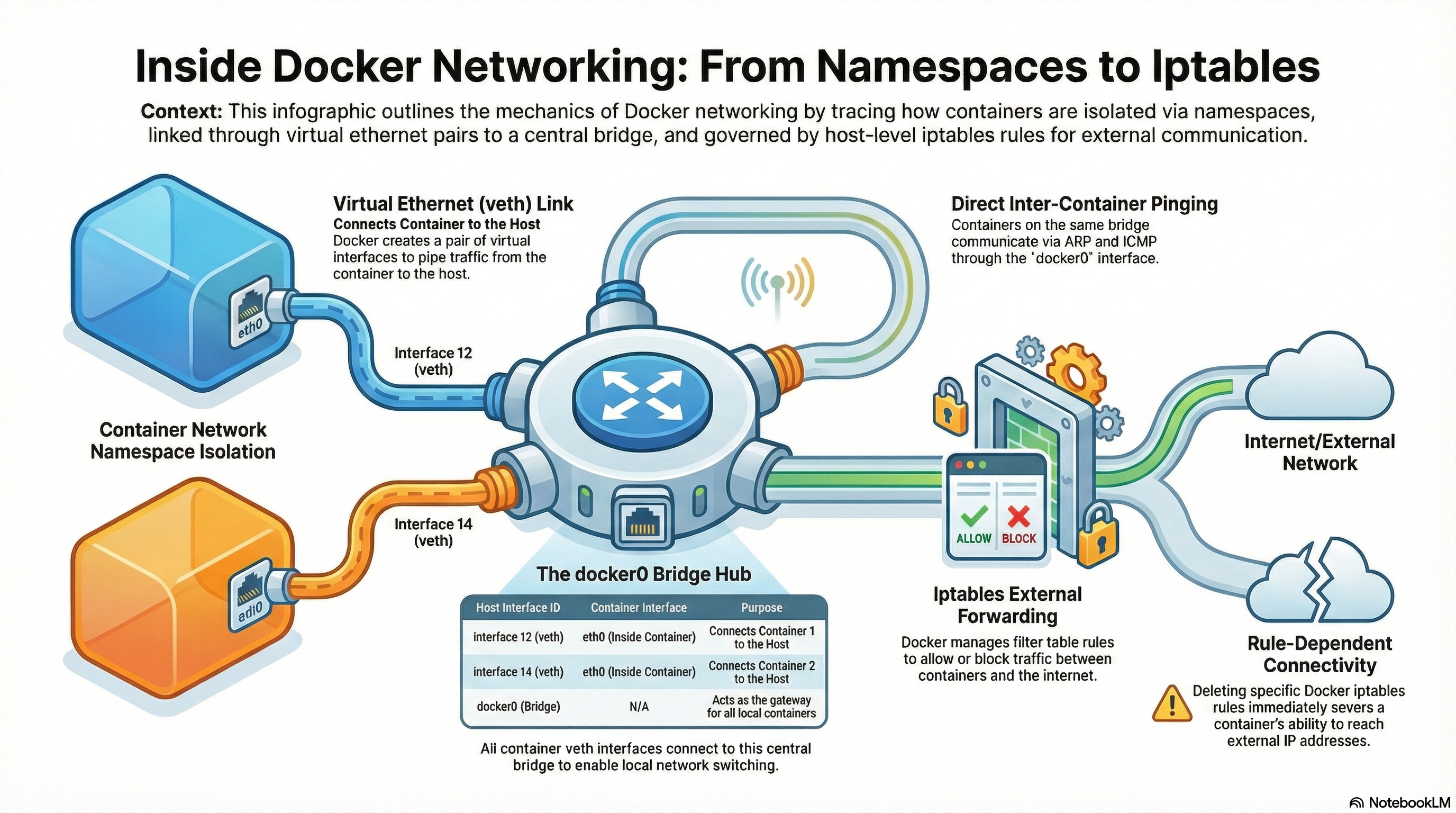
Docker uses three Linux kernel features:
- Network Namespaces
- Virtual Ethernet (veth) pairs
- Linux Bridge
These are not Docker inventions. They are standard Linux features. Docker simply automates wiring them together.
Production Lab Setup
We are working on a clean Ubuntu 24.04 server.
Check system info:
$ uname -a
Linux ubuntu 6.8.0-xx-generic #xx-Ubuntu SMP x86_64 GNU/Linux
Check Docker version:
$ docker version
Client: Docker Engine - Community
 Version:           26.x.x
Check current network interfaces before starting containers:
$ ip -br addr
lo               UNKNOWN        127.0.0.1/8 ::1/128
eth0             UP             192.168.1.10/24 fe80::a00:27ff:fe4e:66a1/64
No docker bridge yet (if Docker service not started).
Start Docker:
$ sudo systemctl start dockerNow check again:
$ ip -br addr
lo               UNKNOWN        127.0.0.1/8 ::1/128
eth0             UP             192.168.1.10/24 fe80::a00:27ff:fe4e:66a1/64
docker0          DOWN           172.17.0.1/16
The docker0 bridge is created automatically.
Deconstructing the Container Network
Start two Nginx containers:
$ sudo docker run -d --name ng1 nginx
a1b2c3d4e5f6...

$ sudo docker run -d --name ng2 nginx
f6e5d4c3b2a1...
List running containers:
$ docker ps
CONTAINER ID   IMAGE    NAME
a1b2c3d4e5f6   nginx    ng1
f6e5d4c3b2a1   nginx    ng2
What Changed on the Host?
Check interfaces:
$ ip link
...
4: docker0: <BROADCAST,MULTICAST,UP> ...
6: veth7abc123@if5: <BROADCAST,MULTICAST,UP> ...
7: veth8def456@if6: <BROADCAST,MULTICAST,UP> ...
What are these?
docker0→ Linux bridge (virtual switch)vethXXXX→ One end of virtual ethernet cable
Each container gets one veth pair.
Entering the Container Network Namespace
Docker hides namespaces from ip netns, but they exist.
Get container PID:
$ docker inspect -f '{{.State.Pid}}' ng1
12345
Link its namespace:
$ sudo ln -s /proc/12345/ns/net /var/run/netns/ng1Now inspect inside:
$ sudo ip netns exec ng1 ip -br addr
lo               UNKNOWN        127.0.0.1/8 ::1/128
eth0@if6         UP             172.17.0.2/16 fe80::42:acff:fe11:2/64
Inside the container:
eth0has private IP (172.17.0.2)- It connects to a veth interface on the host
This is how packets move:
Container eth0 → veth pair → docker0 bridge → host routing
It is memory-to-memory transfer inside the kernel.
Understanding the Bridge
Inspect bridge:
$ bridge link
6: veth7abc123 state UP master docker0
7: veth8def456 state UP master docker0
This shows:
- Both containers connected to docker0
- docker0 acts like a switch
The “Deleted Rule” Disaster
Docker relies heavily on iptables NAT rules.
List NAT table:
$ sudo iptables -t nat -L -n -v
Chain DOCKER (2 references)
 pkts bytes target     prot opt in     out     source    destination
Flush Docker chain:
$ sudo iptables -t nat -F DOCKERNow containers lose internet access.
Test inside container:
$ sudo ip netns exec ng1 ping 8.8.8.8
connect: Network is unreachable
Containers are still running:
$ docker ps
ng1   nginx   Up 2 minutes
But networking is broken.
Senior engineers check counters:
$ sudo iptables -nvLBefore blaming application code.
Deep Technical Explanation: Packet Forwarding Path
When container tries to reach 8.8.8.8:
Step 1: Packet leaves container
$ sudo ip netns exec ng1 ping 8.8.8.8Step 2: Packet enters host via veth
Check routing table:
$ ip route
default via 192.168.1.1 dev eth0
172.17.0.0/16 dev docker0 proto kernel scope link src 172.17.0.1
Step 3: IP forwarding must be enabled
$ sysctl net.ipv4.ip_forward
net.ipv4.ip_forward = 1
If it is 0:
$ sudo sysctl -w net.ipv4.ip_forward=1Step 4: Masquerading (SNAT)
Check POSTROUTING:
$ sudo iptables -t nat -L POSTROUTING -n -v
MASQUERADE  all  --  172.17.0.0/16  anywhere
This rewrites:
Source: 172.17.0.2 To: 192.168.1.10
So replies return correctly.
Inter-Container Isolation
Check bridge netfilter setting:
$ sysctl net.bridge.bridge-nf-call-iptables
net.bridge.bridge-nf-call-iptables = 1
This forces bridge traffic through iptables FORWARD chain.
If FORWARD policy is DROP:
$ sudo iptables -P FORWARD DROPContainers stop talking to each other unless ACCEPT rule exists.
This is how Docker controls isolation.
Real Production Problem: conntrack Table Full
Check conntrack limit:
$ sysctl net.netfilter.nf_conntrack_max
net.netfilter.nf_conntrack_max = 262144
Check current usage:
$ sudo cat /proc/sys/net/netfilter/nf_conntrack_count
245000
If table fills up, kernel logs:
$ dmesg | grep conntrack
nf_conntrack: table full, dropping packet
Symptoms:
- Connection timeouts
- Random API failures
- CPU and memory look normal
Correct solution:
- Use connection pooling
- Reduce short-lived connections
- Tune limit carefully
Do not blindly increase the value.
Security: DOCKER-USER Chain
List filter table:
$ sudo iptables -L -n -v
Chain DOCKER-USER (1 references)
This chain is processed before Docker rules.
Add custom firewall rule safely:
$ sudo iptables -I DOCKER-USER -s 10.0.0.0/8 -j DROPDo not modify FORWARD directly. Docker may override it.
Performance Optimization Insight
If two containers communicate heavily:
Instead of TCP over bridge:
- Use Unix Domain Socket via shared volume
- Or use AF_VSOCK
This bypasses:
- Bridge
- iptables
- TCP/IP overhead
Result: lower latency and higher throughput.
Core Mental Model: Physical Patch Panel
Think physically, not logically.
Network Namespace → Locked room VETH Pair → Ethernet cable Bridge → Switch iptables → Security guard
When container starts:
- Docker creates namespace
- Creates veth pair
- Connects to bridge
- Programs iptables rules
If any part fails:
- Cable unplugged → veth issue
- Switch broken → bridge issue
- Guard blocking → iptables issue
Packets stop moving.
Conclusion
You now understand:
- How namespaces isolate networking
- How veth pairs connect container to host
- How docker0 acts as a switch
- How iptables performs NAT and filtering
- How conntrack can silently break production
When you understand the packet path, you can debug anything.
This is the difference between using Docker and mastering it.