Why Your Containers Can't Talk: The Hidden War Between iptables, Docker, and the Linux Bridge
This post is part of the Container Networking From Scratch series — follow a packet’s path through the Linux kernel, from namespaces to NAT.
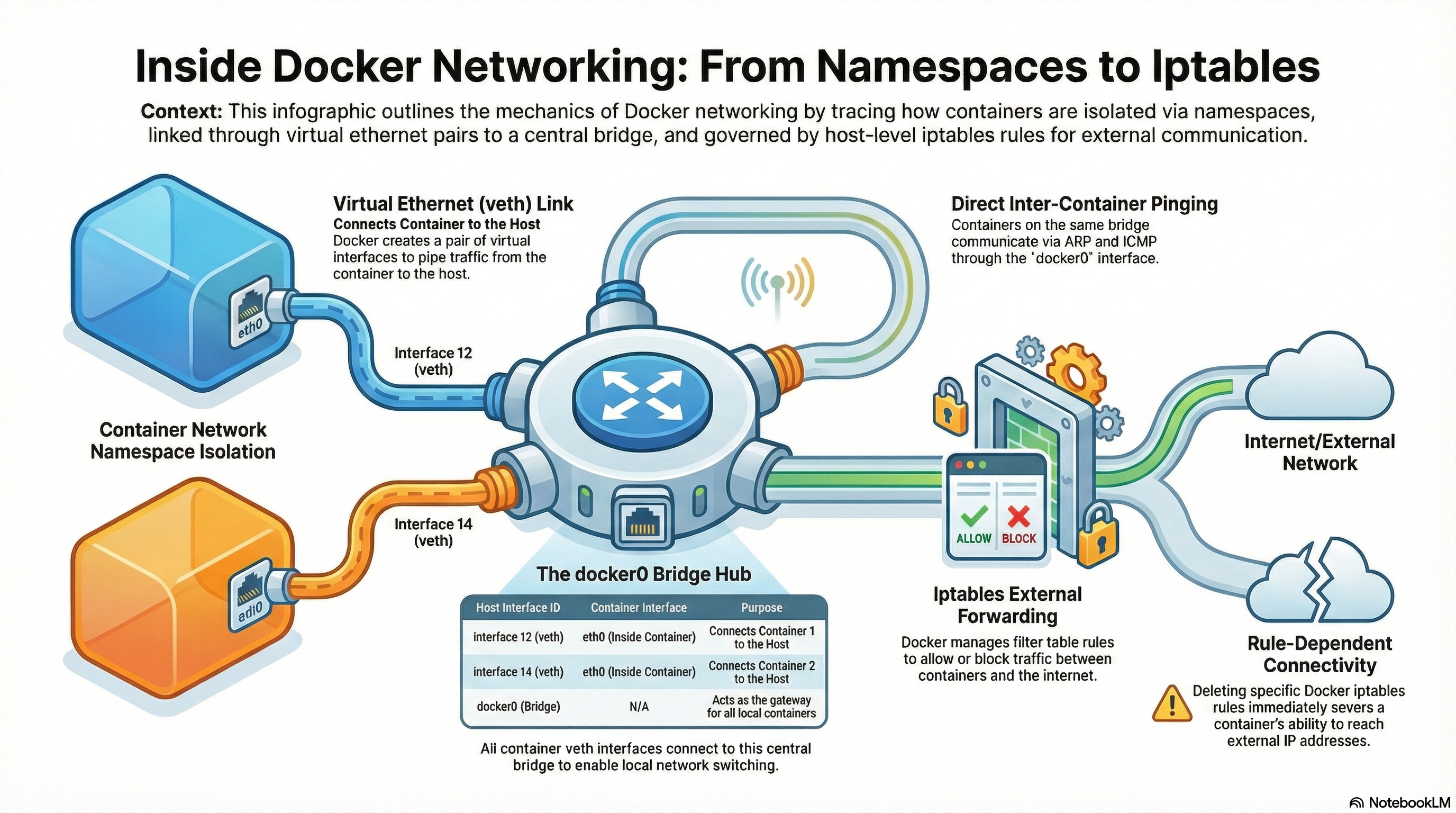
Docker networking is not magic. It is Linux bridge + veth pairs + Netfilter (iptables).
When containers suddenly stop communicating, it is usually not Docker itself. It is the interaction between:
- Linux bridge (Layer 2)
- Netfilter hooks (Layer 3)
- The
FORWARDchain policy - The
bridge-nf-call-iptableskernel setting
This guide builds everything manually so you can see exactly what is happening.
The Gatekeeper of the Linux Kernel
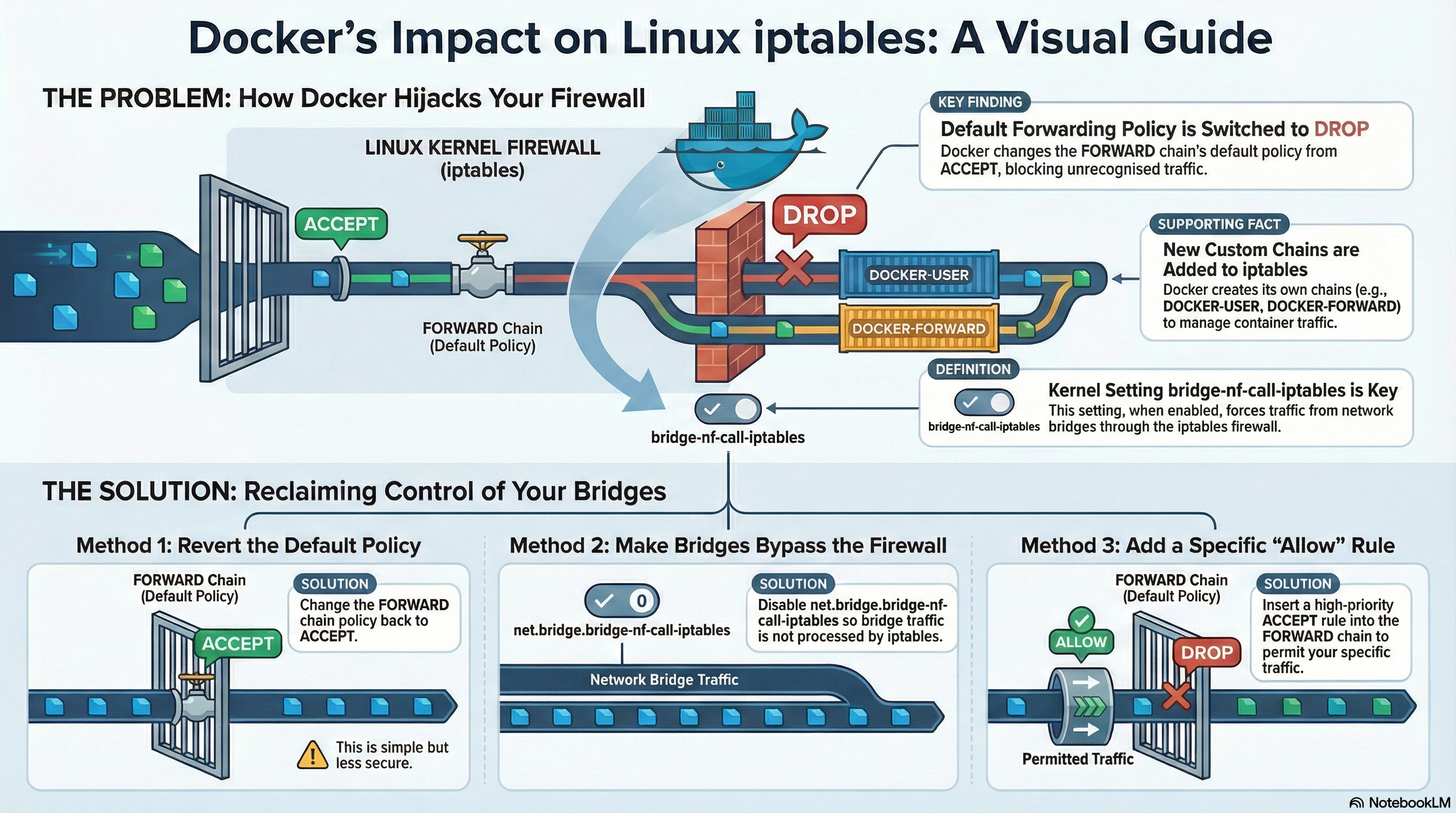
Netfilter is the packet filtering framework inside the Linux kernel. iptables is just the user interface to manage those rules.
When a packet travels through the system, it hits different chains:
| Chain | Purpose |
|---|---|
| INPUT | Traffic destined for the host |
| OUTPUT | Traffic generated by the host |
| FORWARD | Traffic passing through the host |
Important detail:
When net.bridge.bridge-nf-call-iptables=1,
even pure bridge traffic is forced through the FORWARD chain.
That is where most production issues start.
Lab Setup (No Docker, Pure Linux)
We will create:
- Two namespaces:
ns1,ns2 - One bridge:
br0 - VETH pairs
- Same subnet:
10.22.33.0/24
Goal: Make ping work, then break it using iptables.
Step 1: Create Namespaces
$ sudo ip netns add ns1
$ sudo ip netns add ns2
Verify:
$ ip netns list
ns1
ns2
Step 2: Create Bridge
$ sudo ip link add br0 type bridge
$ sudo ip addr add 10.22.33.1/24 dev br0
$ sudo ip link set br0 up
Verify:
$ ip -br addr show br0
br0             UP             10.22.33.1/24
Step 3: Create VETH Pairs
$ sudo ip link add veth1 type veth peer name veth1-br
$ sudo ip link add veth2 type veth peer name veth2-br
Attach bridge sides:
$ sudo ip link set veth1-br master br0
$ sudo ip link set veth2-br master br0
$ sudo ip link set veth1-br up
$ sudo ip link set veth2-br up
Move peers to namespaces:
$ sudo ip link set veth1 netns ns1
$ sudo ip link set veth2 netns ns2
Step 4: Assign IP Addresses
Inside ns1:
$ sudo ip netns exec ns1 ip addr add 10.22.33.2/24 dev veth1
$ sudo ip netns exec ns1 ip link set veth1 up
$ sudo ip netns exec ns1 ip link set lo up
Inside ns2:
$ sudo ip netns exec ns2 ip addr add 10.22.33.3/24 dev veth2
$ sudo ip netns exec ns2 ip link set veth2 up
$ sudo ip netns exec ns2 ip link set lo up
Verify:
$ sudo ip netns exec ns1 ip -br addr
veth1           UP             10.22.33.2/24
$ sudo ip netns exec ns2 ip -br addr
veth2 UP 10.22.33.3/24Step 5: Test Connectivity (Works)
$ sudo ip netns exec ns1 ping 10.22.33.3
64 bytes from 10.22.33.3: icmp_seq=1 ttl=64 time=0.07 ms
Bridge is working as pure Layer 2 switch.
No routing involved.
Step 6: Break the Network
Set default FORWARD policy to DROP:
$ sudo iptables -P FORWARD DROPCheck:
$ sudo iptables -L FORWARD -n -v
Chain FORWARD (policy DROP)
Now try ping again:
$ sudo ip netns exec ns1 ping 10.22.33.3It fails.
Even though:
- Same subnet
- Same bridge
- No routing required
Why?
Because bridged traffic is being passed to iptables.
The Hidden Switch: bridge-nf-call-iptables
Check current value:
$ sysctl net.bridge.bridge-nf-call-iptables
net.bridge.bridge-nf-call-iptables = 1
When set to 1:
Bridge traffic enters the FORWARD chain.
Disable it:
$ sudo sysctl -w net.bridge.bridge-nf-call-iptables=0
net.bridge.bridge-nf-call-iptables = 0
Try ping again:
$ sudo ip netns exec ns1 ping 10.22.33.3
64 bytes from 10.22.33.3: icmp_seq=1 ttl=64 time=0.06 ms
It works again.
Now the bridge behaves like pure Layer 2.
Why Docker Requires bridge-nf-call-iptables=1
Docker needs to:
- Apply NAT rules
- Enforce inter-container isolation
- Control published ports
Without bridge → iptables integration:
Containers could bypass firewall rules.
So in Docker environments:
net.bridge.bridge-nf-call-iptables = 1is required.
That means your FORWARD chain must be configured properly.
The Correct Secure Fix
Instead of disabling bridge filtering, allow bridge traffic explicitly:
$ sudo iptables -I FORWARD 1 -i br0 -o br0 -j ACCEPTVerify:
$ sudo iptables -L FORWARD -n -vNow ping works even with policy DROP.
This is the secure approach.
Understanding conntrack
Netfilter uses connection tracking.
Common rule:
$ sudo iptables -A FORWARD -m conntrack --ctstate ESTABLISHED,RELATED -j ACCEPTWhat it does:
- First packet must match an allow rule
- Subsequent packets automatically allowed
- Reduces rule complexity
Always place this rule at the top for performance.
Docker Chain Injection
If Docker is installed, run:
$ sudo iptables -L -nYou may see:
- DOCKER
- DOCKER-USER
- DOCKER-ISOLATION
Important:
Docker modifies FORWARD automatically.
Best practice:
Add custom rules in:
DOCKER-USERDocker will not overwrite that chain.
Example:
$ sudo iptables -I DOCKER-USER -i br0 -o br0 -j ACCEPTReal Production Failure: Silenced Microservice
Scenario:
Security team sets:
iptables -P FORWARD DROPResult:
- Containers cannot talk to each other
- Host can still reach containers
- Containers can reach host
- Only container-to-container traffic is broken
Check packet counters:
$ sudo iptables -vnL FORWARDYou will see DROP counter increasing.
The fix is targeted ACCEPT rules — not reverting policy to ACCEPT.
Performance Insight
iptables is processed linearly.
If your rule order is:
- Rare rule
- Rare rule
- Rare rule
- Most common rule
Every packet evaluates first three rules unnecessarily.
Best practice:
- ESTABLISHED,RELATED
- Most common traffic
- Less frequent rules
- Default DROP
Advanced Optimization: raw Table and NOTRACK
High traffic systems may overload conntrack.
Check usage:
$ cat /proc/sys/net/netfilter/nf_conntrack_count
$ cat /proc/sys/net/netfilter/nf_conntrack_max
If full → packets dropped silently.
To bypass tracking for specific traffic:
$ sudo iptables -t raw -A PREROUTING -p udp --dport 53 -j NOTRACKUse carefully.
Mental Model: The Checkpoint
Bridge = Highway bridge-nf-call-iptables = Law requiring inspection FORWARD chain = Inspection checkpoint iptables rules = Inspectors
If checkpoint exists but no one waves cars through, traffic stops.
Final Summary
You now understand:
- Why bridge traffic can hit the FORWARD chain
- How
bridge-nf-call-iptableschanges behavior - Why setting
FORWARDto DROP can break containers - How Docker injects rules
- Why DOCKER-USER chain is safest for customization
- How conntrack affects performance
- How to debug silent container isolation failures
When containers cannot talk, do not restart Docker.
Check:
iptables -L -n -vsysctl net.bridge.bridge-nf-call-iptables- FORWARD policy
- DOCKER-USER chain
That is how you debug like a production engineer.