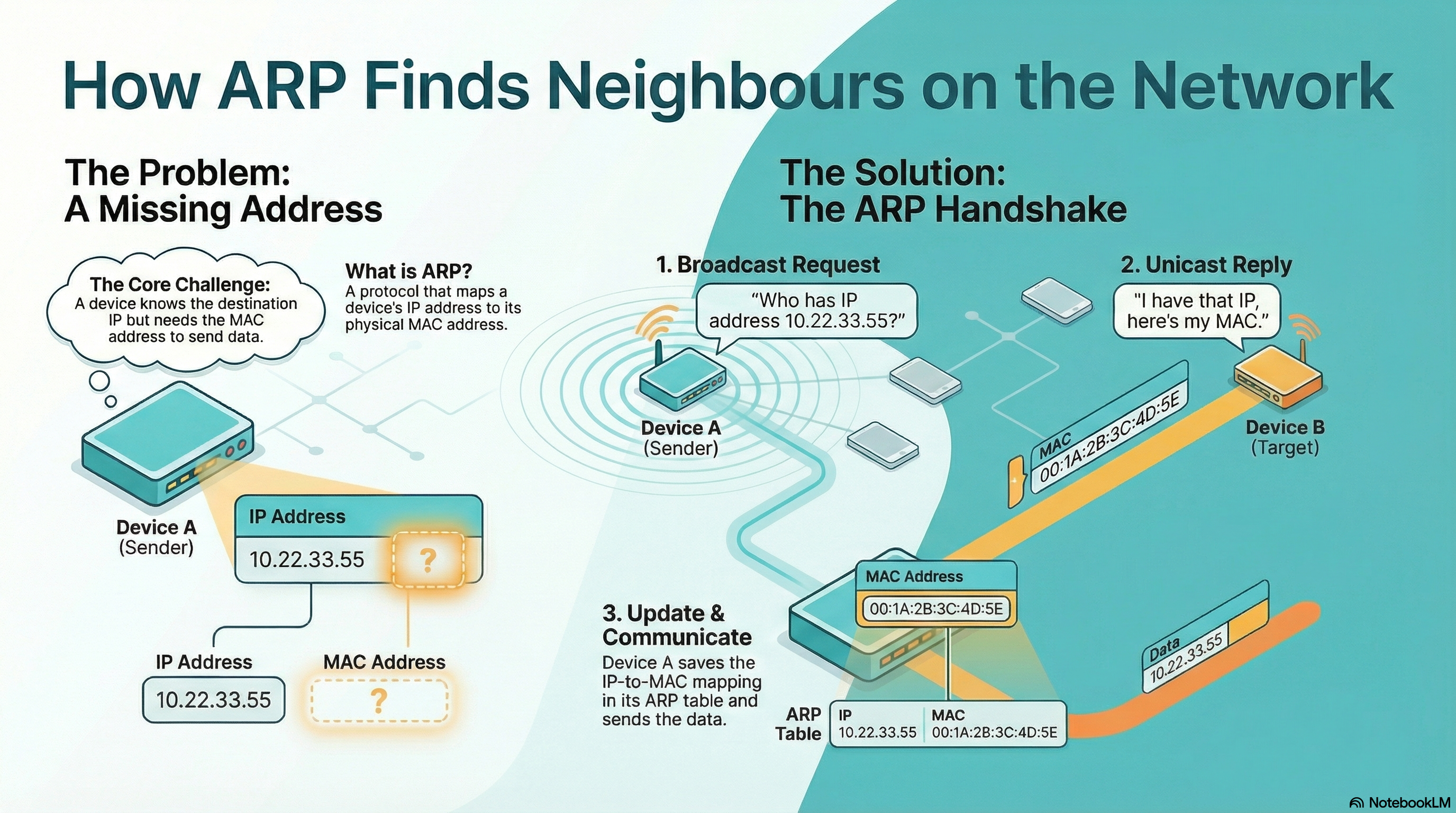
Why Your Containers Can't Talk: Mastering Linux IP and ARP Resolution
This post is part of the Container Networking From Scratch series — follow a packet’s path through the Linux kernel, from namespaces to NAT.
Most DevOps engineers understand IP addresses. Very few understand how the Linux kernel actually resolves an IP address into a MAC address inside a virtualized container environment.
If you cannot clearly explain how Layer 3 (IP) becomes Layer 2 (MAC), you are guessing when container networking breaks.
This guide demonstrates the full ARP resolution process using Linux Network Namespaces and VETH pairs — exactly the same primitives used by Docker and Kubernetes.
The Bridge Between Layers
When you send traffic in a cloud-native system, you think in terms of IP addresses.
But Ethernet does not deliver packets using IP addresses.
At Layer 2, communication happens using MAC addresses.
This creates a problem:
- Applications send packets to an IP.
- Network interfaces transmit frames to a MAC.
The protocol that bridges this gap is:
ARP — Address Resolution Protocol
ARP maps:
IPv4 Address → MAC AddressWithout ARP:
- The packet reaches the interface
- But the interface does not know which neighboring machine owns the destination IP
- The frame cannot be delivered
In container environments where interfaces are constantly created and destroyed, ARP resolution is critical.
Building the Virtual Lab
We will simulate two hosts on the same Layer 2 network using namespaces.
Environment:
- Ubuntu 24.04
- iproute2
- tcpdump
Install tools:
$ sudo apt update
$ sudo apt install -y iproute2 tcpdump
Constructing the Network Path
Step 1 — Create Two Isolated Namespaces
$ sudo ip netns add ns1
$ sudo ip netns add ns2
Verify:
$ sudo ip netns list
ns1
ns2
At this moment:
- Both namespaces are empty
- Only loopback exists
- No connectivity between them
Step 2 — Create the Virtual Cable
Create a VETH pair:
$ sudo ip link add veth1 type veth peer name veth2Check on host:
$ ip -br linkExample output:
lo               UNKNOWN
eth0             UP
veth1@veth2      DOWN
veth2@veth1      DOWN
This is a virtual patch cable with two ends.
Step 3 — Plug Each End Into a Namespace
Move interfaces:
$ sudo ip link set veth1 netns ns1
$ sudo ip link set veth2 netns ns2
Rename them to eth0 for realism:
$ sudo ip netns exec ns1 ip link set veth1 name eth0
$ sudo ip netns exec ns2 ip link set veth2 name eth0
Step 4 — Assign IP Addresses
Inside ns1:
$ sudo ip netns exec ns1 ip addr add 10.22.33.1/24 dev eth0
$ sudo ip netns exec ns1 ip link set eth0 up
$ sudo ip netns exec ns1 ip link set lo up
Inside ns2:
$ sudo ip netns exec ns2 ip addr add 10.22.33.55/24 dev eth0
$ sudo ip netns exec ns2 ip link set eth0 up
$ sudo ip netns exec ns2 ip link set lo up
Verify in ns1:
$ sudo ip netns exec ns1 ip -br addrOutput:
lo               UNKNOWN        127.0.0.1/8 ::1/128
eth0             UP             10.22.33.1/24
Verify in ns2:
$ sudo ip netns exec ns2 ip -br addrOutput:
lo               UNKNOWN        127.0.0.1/8 ::1/128
eth0             UP             10.22.33.55/24
We now have a functional Layer 2 network.
Inspecting the ARP Table (Neighbor Cache)
Inside ns1:
$ sudo ip netns exec ns1 ip neigh showOutput:
<empty>The kernel has no MAC address mapping for 10.22.33.55.
This means the first ping will trigger ARP.
Watching ARP in Real Time
Start tcpdump inside ns1:
$ sudo ip netns exec ns1 tcpdump -i eth0 -n arp or icmpOpen another terminal and run:
$ sudo ip netns exec ns1 ping -c 2 10.22.33.55You will observe something like:
ARP, Request who-has 10.22.33.55 tell 10.22.33.1
ARP, Reply 10.22.33.55 is-at 8a:3b:12:44:aa:91
IP 10.22.33.1 > 10.22.33.55: ICMP echo request
IP 10.22.33.55 > 10.22.33.1: ICMP echo reply
This proves:
- Kernel did not know MAC
- Broadcasted ARP request
- Received unicast reply
- Updated neighbor table
- Sent ICMP packet
Deep Dive: The Four-Step Resolution
When you run:
$ ping 10.22.33.55The kernel performs:
1. Table Lookup
Checks ARP cache:
$ sudo ip netns exec ns1 ip neigh showIf entry exists, it sends packet immediately.
2. Broadcast Request
If entry missing:
- Kernel pauses ICMP packet
- Sends broadcast to:
ff:ff:ff:ff:ff:ffMessage:
Who has 10.22.33.55? Tell 10.22.33.13. Unicast Reply
Only ns2 responds:
10.22.33.55 is-at 8a:3b:12:44:aa:91Sent directly back to requester.
4. Table Update
Check neighbor table again:
$ sudo ip netns exec ns1 ip neigh showNow you will see:
10.22.33.55 dev eth0 lladdr 8a:3b:12:44:aa:91 REACHABLEThe kernel now has a valid Layer 2 mapping.
The ARP Cache Poisoning of Productivity
In high-churn environments like Kubernetes:
- Pod A uses IP 10.22.33.55
- Pod A dies
- Pod B gets same IP
If ARP cache is stale:
- Traffic goes to old MAC
- Packets disappear
- You see “Destination Host Unreachable”
Always check:
$ ip neighIf needed, clear entry:
$ sudo ip neigh flush allProduction Traffic and ARP Storms
ARP uses broadcast.
In large flat networks:
- Every broadcast hits every interface
- CPU must process each broadcast
- High softirq usage may appear
Check softirq:
$ cat /proc/softirqsARP storms happen when:
- Interfaces flap
- Massive container churn
- Large Layer 2 domains
Solutions include:
- L3 segmentation
- ARP proxy
- Limiting broadcast domains
Hardening the Data Link Layer
ARP has no authentication.
An attacker can send:
10.22.33.1 is-at attacker-macThis is ARP Spoofing.
Mitigations:
- Static ARP entries (small scale)
- Dynamic ARP Inspection (switch-level)
- Monitor neighbor table changes
Monitor:
$ watch -n 1 ip neighUnexpected MAC changes are red flags.
Mental Model: The Address Book
Think of ARP as an address book.
IP = Person’s name MAC = Physical street address
Broadcast = Shouting in a room Unicast reply = Person handing you business card
ARP cache = Pocket storing that card
Once stored, kernel stops shouting until entry expires.
Conclusion
We demonstrated:
- How IP resolves to MAC
- How ARP broadcasts work
- How neighbor tables update
- Why stale ARP breaks clusters
- Why ARP storms affect performance
- Why ARP spoofing is dangerous
By simulating this using namespaces and VETH pairs, we reproduced exactly how containers communicate on a host.
Understanding this Layer 3 to Layer 2 transition is what allows you to debug real production “unreachable” errors with confidence instead of guessing.
If you master this, container networking stops being mysterious and becomes predictable.