Linux Routing Internals: Why Your Multi-Subnet Traffic is Dropping
This post is part of the Container Networking From Scratch series — follow a packet’s path through the Linux kernel, from namespaces to NAT.
Most engineers think they understand routing until they connect two different subnets and packets disappear. This guide explains exactly why Linux drops traffic, especially in multi-subnet environments like Kubernetes.
We will:
- Build a multi-subnet lab using network namespaces
- Watch routing decisions in real time
- Break traffic on purpose
- Fix it properly
- Understand why
rp_filtersilently drops packets
Everything includes real terminal commands and expected outputs so you can follow along.
The Traffic Controller of the Modern Cloud
In Kubernetes, VPCs, overlays, and CNIs, Linux is the router.
- Every worker node is a router
- Every pod has a routing table
- Every packet passes through the Linux kernel routing engine
When traffic fails, it is usually because of:
- Missing routes
- Disabled forwarding
- Reverse Path Filtering (
rp_filter) - ARP not resolving
- FIB validation failure
If you do not understand how the kernel validates traffic, debugging production networking becomes guesswork.
Production Sandbox Setup
Environment:
- Ubuntu 24.04
- Vagrant VM
- 2 CPU
- 2GB RAM
We will build:
| Component | Purpose |
|---|---|
| ns1 | Subnet 10.22.33.0/24 |
| ns2 | Subnet 10.22.34.0/24 |
| br0 | Bridge connecting both |
| veth pairs | Virtual cables |
Goal:
Make 10.22.33.1 talk to 10.22.34.1
Step 1: Create Namespaces
$ sudo ip netns add ns1
$ sudo ip netns add ns2
Verify:
$ ip netns list
ns1
ns2
Step 2: Create a Bridge
$ sudo ip link add br0 type bridge
$ sudo ip link set br0 up
Check:
$ ip -br link show br0
br0             UP             7a:6f:aa:19:44:12 <BROADCAST,MULTICAST,UP,LOWER_UP>
Step 3: Create VETH Pairs
These act like virtual cables.
$ sudo ip link add veth1 type veth peer name veth1-br
$ sudo ip link add veth2 type veth peer name veth2-br
Move one side into namespaces:
$ sudo ip link set veth1 netns ns1
$ sudo ip link set veth2 netns ns2
Attach bridge sides:
$ sudo ip link set veth1-br master br0
$ sudo ip link set veth2-br master br0
$ sudo ip link set veth1-br up
$ sudo ip link set veth2-br up
Step 4: Configure IP Addresses
Inside ns1:
$ sudo ip netns exec ns1 ip addr add 10.22.33.1/24 dev veth1
$ sudo ip netns exec ns1 ip link set veth1 up
$ sudo ip netns exec ns1 ip link set lo up
Inside ns2:
$ sudo ip netns exec ns2 ip addr add 10.22.34.1/24 dev veth2
$ sudo ip netns exec ns2 ip link set veth2 up
$ sudo ip netns exec ns2 ip link set lo up
Verify:
$ sudo ip netns exec ns1 ip -br addr
lo               UNKNOWN        127.0.0.1/8 ::1/128
veth1            UP             10.22.33.1/24
$ sudo ip netns exec ns2 ip -br addr
lo UNKNOWN 127.0.0.1/8 ::1/128
veth2 UP 10.22.34.1/24Step 5: Test Connectivity (It Will Fail)
$ sudo ip netns exec ns1 ping 10.22.34.1
connect: Network is unreachable
Why?
Check routing table:
$ sudo ip netns exec ns1 ip route show
10.22.33.0/24 dev veth1 proto kernel scope link src 10.22.33.1
There is no route to 10.22.34.0/24.
Step 6: Add Direct Routes
Add route in ns1:
$ sudo ip netns exec ns1 ip route add 10.22.34.0/24 dev veth1Add reverse route in ns2:
$ sudo ip netns exec ns2 ip route add 10.22.33.0/24 dev veth2Verify:
$ sudo ip netns exec ns1 ip route show
10.22.33.0/24 dev veth1 proto kernel scope link src 10.22.33.1
10.22.34.0/24 dev veth1 scope link
Step 7: Enable IP Forwarding
Linux does not forward packets by default.
Check:
$ sysctl net.ipv4.ip_forward
net.ipv4.ip_forward = 0
Enable:
$ sudo sysctl -w net.ipv4.ip_forward=1
net.ipv4.ip_forward = 1
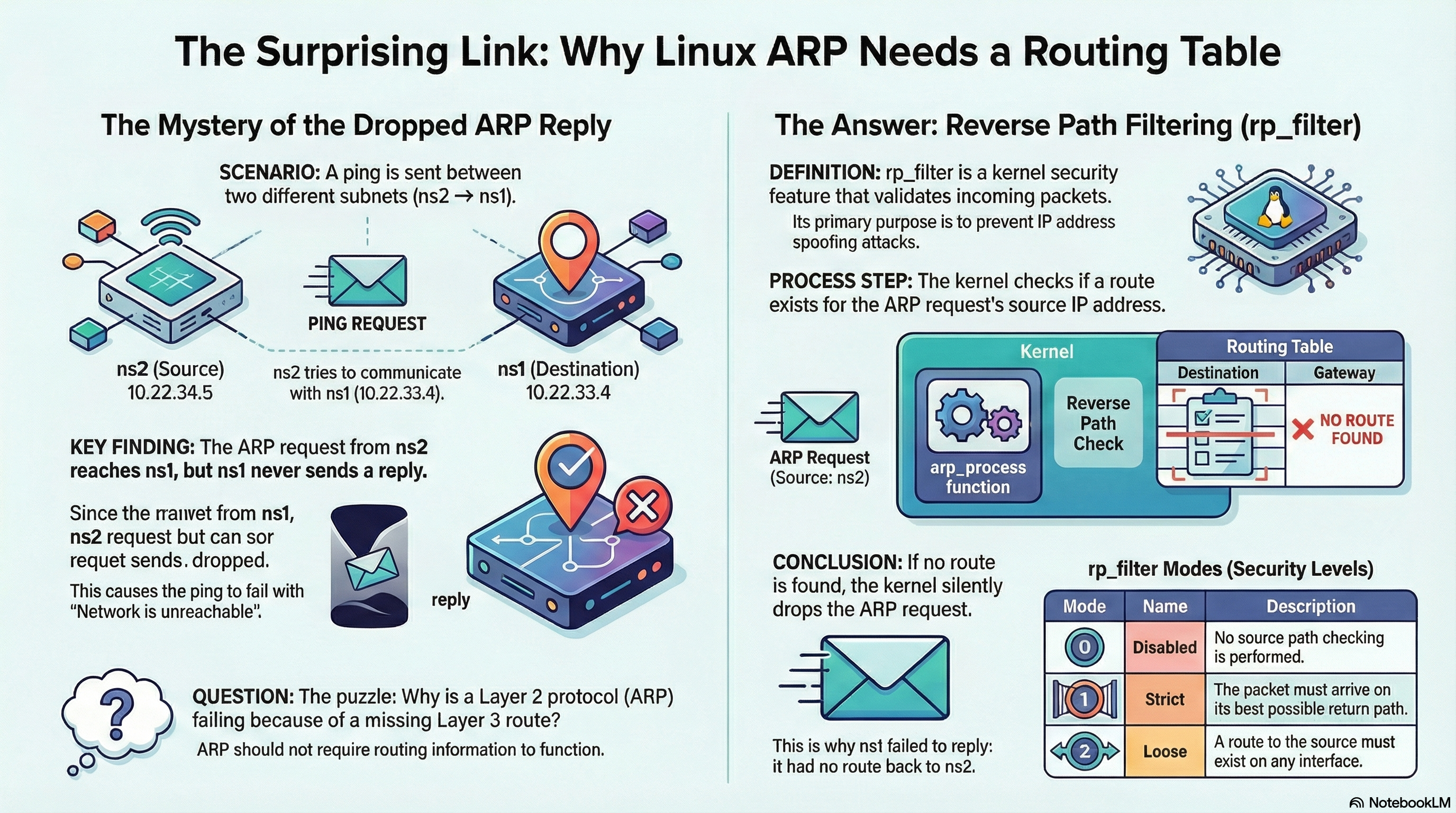
Step 8: Still Not Working? Welcome to rp_filter
Try ping again:
$ sudo ip netns exec ns1 ping 10.22.34.1Sometimes it still fails.
Run tcpdump:
$ sudo tcpdump -i br0 arp
ARP, Request who-has 10.22.34.1 tell 10.22.33.1
ARP, Reply 10.22.34.1 is-at 2a:bc:11:9f:44:21
ARP reply arrives.
But kernel drops it silently.
Why?
The Reverse Path Filter (rp_filter)
Check setting:
$ sysctl net.ipv4.conf.all.rp_filter
net.ipv4.conf.all.rp_filter = 1
Value meanings:
| Value | Mode |
|---|---|
| 0 | Disabled |
| 1 | Strict |
| 2 | Loose |
In strict mode:
The kernel verifies:
“If I wanted to reach the source IP, would I use this same interface?”
If answer is no → packet dropped.
This check happens inside the kernel function:
__fib_validate_source()Drop reason internally:
SKB_DROP_REASON_IP_RPFILTERThis is silent. No logs.
Fix: Use Loose Mode
$ sudo sysctl -w net.ipv4.conf.all.rp_filter=2
net.ipv4.conf.all.rp_filter = 2
Try ping again:
$ sudo ip netns exec ns1 ping 10.22.34.1
PING 10.22.34.1 (10.22.34.1) 56(84) bytes of data.
64 bytes from 10.22.34.1: icmp_seq=1 ttl=64 time=0.095 ms
64 bytes from 10.22.34.1: icmp_seq=2 ttl=64 time=0.082 ms
Now it works.
What Actually Happened Inside the Kernel
When a packet arrives:
- Kernel checks routing table (FIB lookup)
- Ensures route type is unicast
- Validates interface match (if rp_filter=1)
- Drops silently if mismatch
This protects against IP spoofing.
But in container networks, it often breaks valid traffic.
Real Kubernetes Production Failure
In clusters using:
- Calico
- Flannel
- Cilium
Symptoms:
- Some pods can communicate
- Others timeout
- No application logs show errors
Root cause often:
- Strict
rp_filter - Missing back-route
- Asymmetric routing
Fix:
- Set
net.ipv4.conf.all.rp_filter=2 - Ensure routes exist for every pod subnet
- Validate with:
$ ip route show table mainSecurity and Optimization
Keep Strict Mode On Gateways
On internet-facing machines:
net.ipv4.conf.all.rp_filter=1Prevents spoofing.
Audit Routing Table Size
Large clusters may have thousands of routes.
Check:
$ ip route show | wc -lLarge tables increase CPU usage per packet.
Always Check Forwarding
$ sysctl net.ipv4.conf.all.forwardingIf 0 → machine will not route traffic.
Mental Model: GPS + Security Guard
Routing Table = Map ARP Table = House Address rp_filter = Security Guard
If the guard thinks someone arrived through the wrong gate, he removes them silently.
For networking to work:
The Map and the Guard must agree.
Final Summary
You learned:
- How to build multi-subnet namespaces
- Why traffic fails between subnets
- How to inspect routing tables
- Why
rp_filterdrops packets - How to fix it safely
- How this affects Kubernetes CNIs
Routing is not just a table.
It is a validation engine inside the Linux kernel.
When you understand FIB lookup and Reverse Path Filtering, you stop guessing and start debugging like a real infrastructure engineer.