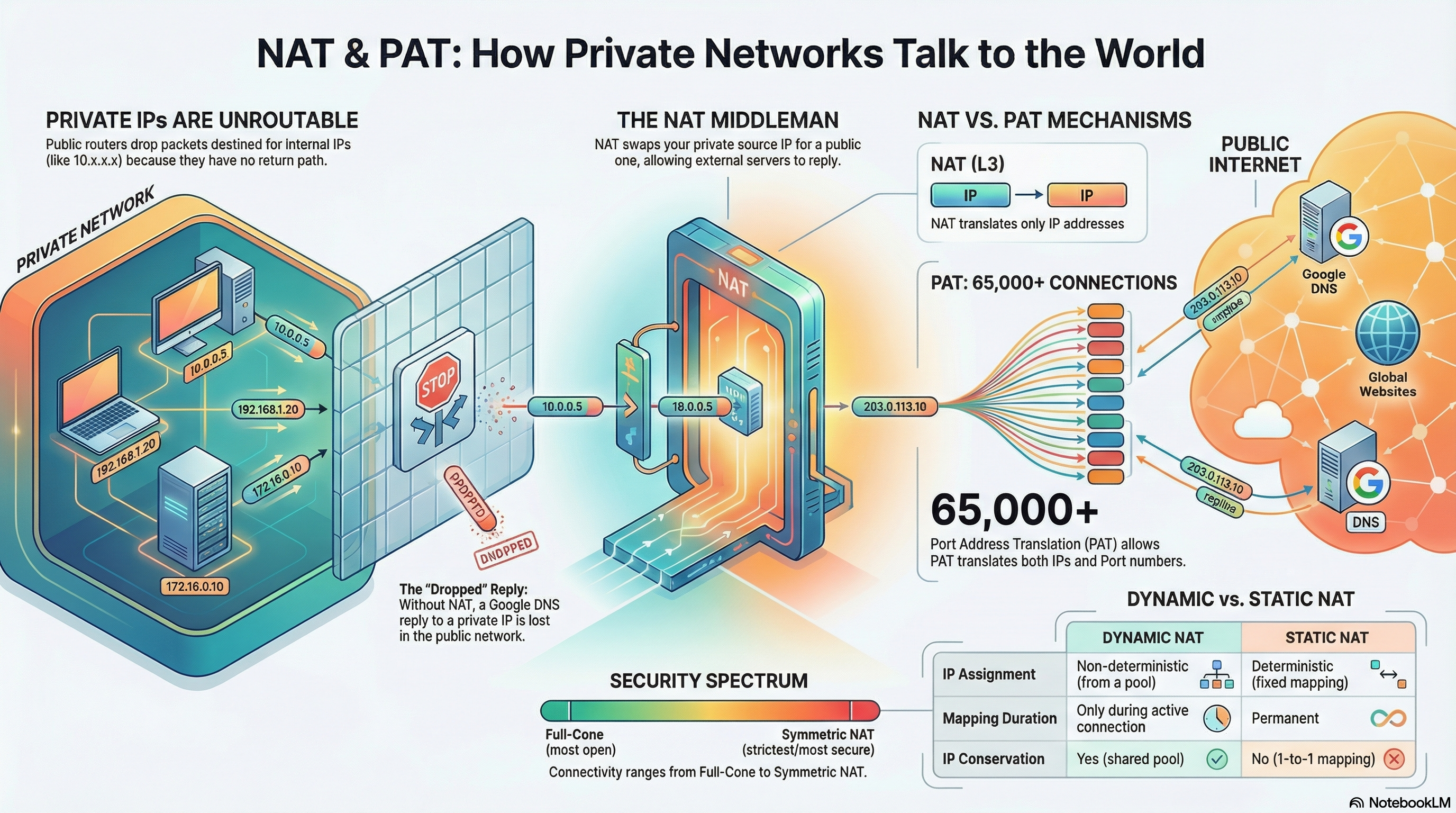
Why Your Private Cloud Can't Reach the Internet
This post is part of the Container Networking From Scratch series — follow a packet’s path through the Linux kernel, from namespaces to NAT.
The NAT and PAT Mystery
Most DevOps engineers can configure a VPC, but when packets get dropped at the edge, they don’t know why. If you don’t understand how the Linux kernel performs address translation, you are one routing mistake away from a production outage.
This guide explains NAT and PAT using a real Linux lab with commands and outputs so you can see exactly what is happening.
The Translator of the Modern Network
IPv4 addresses are limited. NAT (Network Address Translation) allows:
- Thousands of private IPs
- To share one public IP
Without NAT:
If your container sends traffic from 10.22.33.2 to 8.8.8.8, Google would try to reply to 10.22.33.2. That IP is private and not routable on the internet. The reply would never return.
NAT solves the return path problem by rewriting packet headers.
In Linux, NAT is implemented using:
- IP forwarding
- Netfilter framework
- iptables
nattable - conntrack (connection tracking)
Building the Connectivity Lab
We will simulate a private container using a network namespace.
Lab Topology
- Namespace:
ns1 - Private IP:
10.22.33.2/24 - Bridge:
br0 - Gateway IP:
10.22.33.1 - Host WAN interface:
eth0
Step 1: Create Namespace
$ sudo ip netns add ns1Verify:
$ ip netns list
ns1
Step 2: Create veth Pair
This acts like a virtual cable.
$ sudo ip link add veth-ns type veth peer name veth-brMove one side into namespace:
$ sudo ip link set veth-ns netns ns1Step 3: Create Bridge
$ sudo ip link add br0 type bridge
$ sudo ip addr add 10.22.33.1/24 dev br0
$ sudo ip link set br0 up
Attach veth to bridge:
$ sudo ip link set veth-br master br0
$ sudo ip link set veth-br up
Step 4: Configure Namespace Interface
Inside namespace:
$ sudo ip netns exec ns1 ip addr add 10.22.33.2/24 dev veth-ns
$ sudo ip netns exec ns1 ip link set veth-ns up
$ sudo ip netns exec ns1 ip link set lo up
Set default route:
$ sudo ip netns exec ns1 ip route add default via 10.22.33.1Check configuration:
$ sudo ip netns exec ns1 ip -br addr
lo               UNKNOWN        127.0.0.1/8 ::1/128
veth-ns@if5      UP             10.22.33.2/24
Step 5: Test Without NAT (It Will Fail)
Try pinging internet:
$ sudo ip netns exec ns1 ping -c 2 8.8.8.8
connect: Network is unreachable
Why?
Because:
- IP forwarding is disabled
- No NAT rule exists
Step 6: Enable IP Forwarding
Check status:
$ sysctl net.ipv4.ip_forward
net.ipv4.ip_forward = 0
Enable it:
$ sudo sysctl -w net.ipv4.ip_forward=1
net.ipv4.ip_forward = 1
Now the host can forward packets between interfaces.
Step 7: Add NAT (SNAT / MASQUERADE)
Add NAT rule:
$ sudo iptables -t nat -A POSTROUTING -s 10.22.33.0/24 -o eth0 -j MASQUERADEThis means:
Any packet from 10.22.33.0/24 going out eth0
→ Replace source IP with host’s public IP
Check rule:
$ sudo iptables -t nat -L -n -v
Chain POSTROUTING (policy ACCEPT)
 pkts bytes target     prot opt in     out     source          destination
    0     0 MASQUERADE  all  --  *      eth0    10.22.33.0/24   0.0.0.0/0
Step 8: Test Again (Now It Works)
$ sudo ip netns exec ns1 ping -c 2 8.8.8.8
64 bytes from 8.8.8.8: icmp_seq=1 ttl=117 time=18.4 ms
64 bytes from 8.8.8.8: icmp_seq=2 ttl=117 time=17.9 ms
NAT is working.
What Actually Happened to the Packet?
Let’s trace it step by step.
Inside Namespace
Source:
10.22.33.2 → 8.8.8.8On Host Before NAT
Packet reaches br0.
Kernel decides to forward via eth0.
POSTROUTING NAT
The nat table changes:
Source: 10.22.33.2
Becomes: 192.168.1.10 (host public IP)
Now Google sees:
192.168.1.10 → 8.8.8.8Google replies to 192.168.1.10.
The Role of conntrack
Check connection tracking:
$ sudo conntrack -L | grep 10.22.33.2Example output:
icmp     1 29 src=10.22.33.2 dst=8.8.8.8 type=8 code=0
         src=8.8.8.8 dst=192.168.1.10 type=0 code=0
The kernel stores:
- Original source
- Translated source
- Return mapping
When reply arrives:
Destination changes from:
192.168.1.10Back to:
10.22.33.2And packet is forwarded to namespace.
The One-Way Street Problem
NAT only works for outbound initiated traffic.
If someone on the internet tries:
telnet 192.168.1.10 5432The host does not know:
Which internal IP should receive this?
There is no conntrack entry.
Packet is dropped.
This is why:
- Outbound works
- Inbound fails
To allow inbound, you need DNAT or port forwarding.
Example:
$ sudo iptables -t nat -A PREROUTING -p tcp --dport 8080 -j DNAT --to 10.22.33.2:80Now traffic hitting:
HostIP:8080Is forwarded to:
10.22.33.2:80NAT vs PAT
Standard NAT
1 private IP → 1 public IP
Does not scale.
PAT (Port Address Translation)
Many private IPs → 1 public IP Distinguished by source port.
Example:
10.22.33.2:50000 → 8.8.8.8:53
10.22.33.3:50001 → 8.8.8.8:53
Both become:
192.168.1.10:40001
192.168.1.10:40002
Port numbers keep sessions unique.
This is what Docker and cloud NAT gateways use.
Real Production Issue: Port Exhaustion
One public IP supports about 65,000 source ports per destination.
If:
- 5000 pods
- All calling same payment API
- Many short-lived connections
You can exhaust ports.
Symptoms:
- Random connection timeouts
- Works after retry
- CPU looks normal
Check usage:
$ sudo cat /proc/sys/net/netfilter/nf_conntrack_countFix:
- Use connection pooling
- Add more public IPs
- Scale NAT gateway
Security and Optimization
Egress Filtering
Block specific internal IPs:
$ sudo iptables -A FORWARD -s 10.22.33.5 -j DROPPrevents compromised container from exfiltrating data.
NAT Gateway vs NAT Instance
Cloud NAT Gateway:
- Managed
- Scales automatically
- High availability
NAT Instance (Linux VM with iptables):
- Limited conntrack table
- Can crash under load
- Needs manual tuning
For production: use managed NAT gateway.
Mental Model: The PO Box
Private Subnet = Apartment building Internal IP = Apartment number Public IP = Main lobby PO Box NAT = Building manager
When tenant sends mail:
- Manager writes reference number
- Replaces return address with building address
When reply arrives:
- Manager checks logbook
- Delivers to correct apartment
If random mail arrives without reference: It gets discarded.
That is how NAT works.
Conclusion
You now understand:
- Why private IPs cannot reach internet without NAT
- How SNAT rewrites source IP
- How PAT uses ports to multiplex connections
- Why inbound traffic fails by default
- How conntrack maintains state
- Why port exhaustion causes production failures
NAT is not just IP rewriting. It is a stateful translation engine inside the Linux kernel.
When you understand that engine, you can debug any egress problem in Docker, Kubernetes, or cloud VPC environments.