Source NAT Secrets: Why Your Containers Can't Talk to the Internet
This post is part of the Container Networking From Scratch series — follow a packet’s path through the Linux kernel, from namespaces to NAT.
Most DevOps engineers think containers reach the internet automatically. In reality, SNAT (Source Network Address Translation) inside the Linux kernel is doing the real work.
If someone flushes your iptables NAT table, your containers immediately lose internet access. At that moment, YAML files will not save you. You must understand Netfilter.
This guide shows:
- How Docker uses SNAT
- What MASQUERADE actually does
- How to build SNAT manually
- Why static SNAT is better in production
- How conntrack controls everything
All steps include real commands and example outputs.
The Bridge Between Private and Public
By default, Docker assigns container IPs like:
172.17.0.2
172.17.0.3
These are private IPs. They work inside the host.
But the internet does not route private addresses.
If a container sends traffic like this:
172.17.0.2 → 8.8.8.8The reply will never come back.
SNAT solves this by:
- Replacing the source IP with the host’s public IP
- Recording the translation in conntrack
- Reversing the translation when the reply arrives
This is how:
docker pull- API calls
- External database connections
all work.
Production Lab Environment
Environment:
- Ubuntu 24.04
- Docker installed
- One Nginx container
- Default
docker0bridge - Host interface
eth0
Step 1: Start Container
$ sudo docker run -d --name web nginx
d3adb33f1234...
Check container IP:
$ docker inspect -f '{{range .NetworkSettings.Networks}}{{.IPAddress}}{{end}}' web
172.17.0.2
Check host interfaces:
$ ip -br addr
lo               UNKNOWN        127.0.0.1/8 ::1/128
eth0             UP             192.168.1.10/24
docker0          UP             172.17.0.1/16
Step 2: Check Default Docker NAT Rule
List NAT rules:
$ sudo iptables -t nat -SExample output:
-A POSTROUTING -s 172.17.0.0/16 ! -o docker0 -j MASQUERADEThis means:
For traffic from container subnet leaving the host → Replace source IP with host interface IP
This is SNAT using MASQUERADE.
Step 3: Break It (Simulate Production Disaster)
Flush NAT table:
$ sudo iptables -t nat -FNow test from container:
$ sudo docker exec web ping -c 2 8.8.8.8
connect: Network is unreachable
Run tcpdump on host:
$ sudo tcpdump -i eth0 icmpYou may see:
IP 172.17.0.2 > 8.8.8.8: ICMP echo requestPacket leaves with private IP. Internet cannot reply.
SNAT is gone.
Step 4: Add Manual MASQUERADE Rule
$ sudo iptables -t nat -A POSTROUTING -s 172.17.0.0/16 -o eth0 -j MASQUERADECheck rule:
$ sudo iptables -t nat -L POSTROUTING -n -v
Chain POSTROUTING (policy ACCEPT)
 pkts bytes target     prot opt in     out     source
    0     0 MASQUERADE  all  --  *      eth0   172.17.0.0/16
Test again:
$ sudo docker exec web ping -c 2 8.8.8.8
64 bytes from 8.8.8.8: icmp_seq=1 ttl=117 time=18 ms
64 bytes from 8.8.8.8: icmp_seq=2 ttl=117 time=17 ms
It works immediately.
The kernel is now rewriting packets.
What MASQUERADE Actually Does
When packet reaches POSTROUTING:
Original packet:
Source: 172.17.0.2
Destination: 8.8.8.8
After MASQUERADE:
Source: 192.168.1.10
Destination: 8.8.8.8
Reply arrives:
Destination: 192.168.1.10Kernel checks conntrack table and rewrites:
Destination: 172.17.0.2Then forwards to container.
View Live conntrack Table
Install tool if needed:
$ sudo apt install conntrackCheck entries:
$ sudo conntrack -LExample:
icmp     1 29 src=172.17.0.2 dst=8.8.8.8 type=8 code=0
         src=8.8.8.8 dst=192.168.1.10 type=0 code=0
This shows:
Original direction:
172.17.0.2 → 8.8.8.8Reply direction:
8.8.8.8 → 192.168.1.10conntrack links them together.
If this table fills up, NAT stops working.
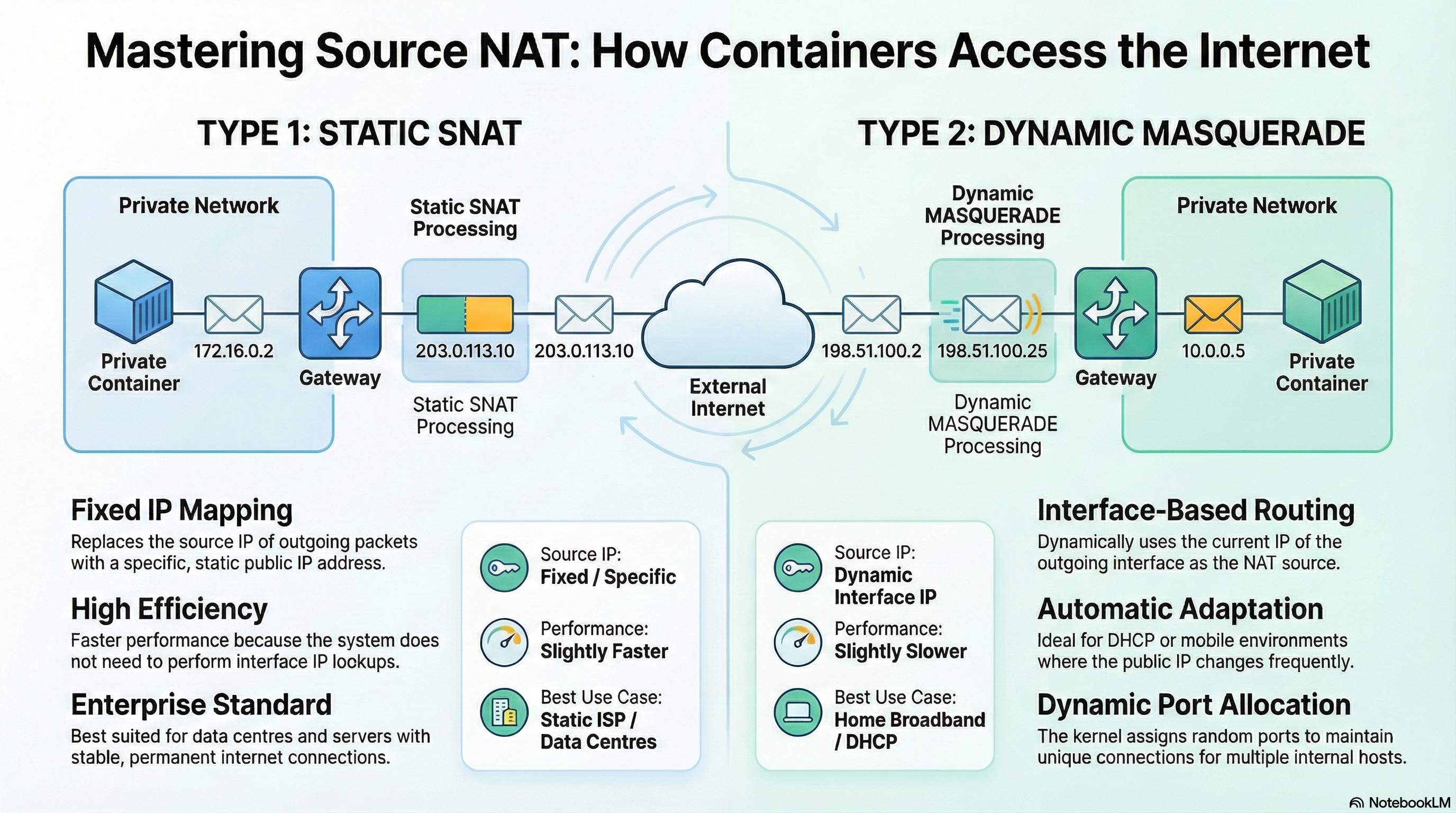
MASQUERADE vs Static SNAT
MASQUERADE
Rule example:
-j MASQUERADECharacteristics:
- Automatically uses outgoing interface IP
- Good for dynamic IP (DHCP)
- Flushes connections if interface goes down
- Slightly more CPU overhead
Static SNAT
Rule example:
$ sudo iptables -t nat -A POSTROUTING -s 172.17.0.0/16 -j SNAT --to-source 192.168.1.10Characteristics:
- Hard-coded public IP
- Faster
- Better for production servers
- Required for IP whitelisting
Use static SNAT when:
- Public IP is fixed
- External services require exact source IP
Production Oversight: Wrong IP Whitelisted
Problem:
- External banking API whitelists
203.0.113.10 - Host has multiple IPs
- MASQUERADE chooses different source IP
Result:
- Random 403 errors
- Looks like authentication problem
- Actually routing problem
Fix:
$ sudo iptables -t nat -A POSTROUTING -s 172.17.0.0/16 -j SNAT --to-source 203.0.113.10Now container always exits with correct IP.
IP Spoofing Risk
SNAT rewrites source IP after FORWARD chain.
If attacker spoofs packet inside container:
Source: 1.2.3.4Without proper filtering, SNAT may rewrite and allow it out.
Solution:
Add strict FORWARD filtering:
$ sudo iptables -A FORWARD -s 172.17.0.5 ! -i docker0 -j DROPEnsure container can only send traffic from its real IP.
Port Range Limiting
Prevent one container from exhausting ports:
$ sudo iptables -t nat -A POSTROUTING -s 172.17.0.0/16 \
  -j SNAT --to-source 192.168.1.10:10000-20000
Limits NAT source ports to specific range.
Monitor conntrack Usage
Check current usage:
$ sysctl net.netfilter.nf_conntrack_countCheck max limit:
$ sysctl net.netfilter.nf_conntrack_maxIf count approaches max:
- You have connection leak
- Or short-lived connection storm
- Or DDoS attempt
Bypass NAT for Internal Traffic
Avoid unnecessary NAT inside VPC:
$ sudo iptables -t nat -A POSTROUTING -d 10.0.0.0/8 -j RETURNThis prevents NAT for internal subnet.
Saves CPU and reduces conntrack usage.
Mental Model: The Return Envelope
Container = Employee desk Private IP = Desk number Public IP = Company address NAT table = Mailroom logbook
When sending mail:
- Clerk replaces desk number with company address
- Writes secret tracking code
- Sends letter
When reply arrives:
- Clerk checks logbook
- Restores desk number
- Delivers mail
If logbook is erased (iptables flush):
- Replies arrive
- Nobody knows who they belong to
- Packets are dropped
Conclusion
You now understand:
- Why containers cannot reach internet without SNAT
- How MASQUERADE works internally
- Why static SNAT is better for production
- How conntrack maintains state
- Why flushing iptables breaks everything
- How to harden and optimize egress traffic
SNAT is not magic. It is a stateful kernel translation process.
When you understand the translation engine, you control container egress completely.
If you are debugging a production networking issue, start by checking:
$ sudo iptables -t nat -L -n -v
$ sudo conntrack -L
$ sysctl net.netfilter.nf_conntrack_count
The problem is usually there.